Sunday, August 24, 2014

DNS - The Internet's Phone Book

My earlier post about filtering Internet content for kids bringing home their school iPads may have created more questions than answers for some parents. The big confusion seems to step from what a Domain Name System (DNS) server is, and how it helps filter out objectionable content.

Let's go waaaaay back in time, back to the birth of the initial global network called ARPANET. Back in the day - and even now - you could reach a remote computer by using its numeric address. To connect to a remote computer, your machine may connect to "192.168.129.34" and send along some pretty data. Those numeric addresses could be a pain to remember however - so shortcuts were created that mapped a human-recognizable name (like "BubbaComp") to the numeric address (like "192.168.129.34"). Solutions were eventually engineered that let people share these lists... that way everyone could have this helpful list of shortcuts. This convention kept evolving as users continued to join the global network, up to today. Now when you type in "amazon.com" your computer is smart enough to look up this shortcut name and find out the numeric address is 176.32.98.166. Your computer always talks to 176.32.98.166, however you talk to your browser using https://amazon.com.

This operates just like a phone book. No one remembers people's phone numbers anymore... or at least I don't. Instead you look up a person's name in your personal address book or the big dead-tree phone book on your front stoop, then communicate using the phone number in the book. Connecting to sites over the Internet works in the very same way.

What if you didn't want your kids visiting certain sites? You could employ the same trick as you might to stop them from calling certain people over the phone - edit the phone book. If your kids can't look up a person's name and find their phone number, they can't call the person. If you edit the Internet's phone book and remove objectionable sites, your kids can't visit the objectionable site on their device of choice. That's exactly what OpenDNS allows you to do - use a phone book that only has acceptable web sites within it.

What if a kid memorizes a phone number tho? Your plan falls apart a bit in that case. DNS filtering has the same limitation - if your kids memorize the IP address of a site (or share an underground DNS server), then they can go directly to the site and bypass your sanctioned "phone book."

If your kids go to a site that has a wide variety of content (like YouTube), you can't filter out specific types of content within the site. Just like calling a party line on the phone... if you allow access to the party line, you can't control anything past the initial dial.

Hopefully that helps explain why OpenDNS is only your first line of filtering. Lemme know in the comments if I can clarify further!

Saturday, August 23, 2014

Web Filtering at Home

[Updated to include an OpenDNS how-to]

Now that iPads are standard issue for a lot of schools, a few parents have asked me how they can block inappropriate material at home. While the schools themselves filter at the network level, as soon as the student comes home the network is wide open.

In all honesty, you can't filter out 100% of all objectionable content. It's hard to have software determine if a YouTube stream is showing questionable video. However, you can audit, track and block some obviously adult sites. The traditional options to perform web filtering include:
  • Software applications or parental controls on the device itself
  • Filtering devices on the router or wireless access point
  • External Internet services that block DNS requests

Software applications give you the most control on a per-device level and can block errant applications as well (like anti-virus software), however you have to install them on each and every device. They also have the benefit of blocking things no matter what network they are attached to. They usually require a medium-level effort to circumvent, and it is sometimes hard to get a report on what the actual activity has been or if any sites had to be blocked.

Filtering devices provide filtering for the entire network and do not rely on software to be installed on the device, which is nice. This solution is the hardest to circumvent, so long as you properly lock down your wireless access point. This solution cares less about applications however, and can’t really tell how appropriate actual content on a site is. It also only controls those devices on your network, and often doesn’t have fine-grained controls.

External Internet services filter your entire network, just like a filtering device would, however it is hosted out on the Internet rather than being something installed or managed inside your house. This option often doesn’t give you much (if any) per-device controls, however they often do a great job of letting you pick what and how many sites to filter out. These solutions often provide reporting as well, letting you see what was viewed by devices on the network. This solution also can’t tell you about the actual content on the site, but just the URL that was visited. This solution is the easiest to circumvent, although this can be mitigated by locking users out of the administrative settings of a device (e.g. not letting users change network settings on an iPad).

What I chose for the house was an external Internet service via OpenDNS. This was easy to set up since I just had to create an account and make a few minor tweaks to our wireless access point, and it gives me some nice reporting on what was blocked. For example, lately I saw a lot of adult sites being blocked and found an iOS application was loading them in the background.

OpenDNS has a Getting Started Guide on their site, but here's an abbreviated version of the steps for setting up OpenDNS on your home network:
  1. First, load up the settings console for your wireless router. Check your user guide for how to do this - usually it involves loading up a web page at http://192.168.1.1 and entering a username and password.
  2. Next, find the "Internet" or "WAN" settings page within your wireless router. This is in your router's user guide as well. It may look something like:
  3. Change the DNS Servers from the automatic settings to the values "208.67.222.222" and "208.67.220.220"
  4. Click on "Apply" or "Save" or whatever floats your router's boat.
  5. Create a new account at http://www.opendns.com/
  6. Part of your account creation process will be linking your local network to your OpenDNS account. Once your local network joins OpenDNS, it will begin monitoring what sites are requested.
  7. After you create your account, you will be taken to the OpenDNS dashboard. At that point you can decide how much filtering you want to apply to your network - from sites that are obviously adult-only to sites that are adult in theme (fashion magazines, for example).

I'll post a subsequent entry on what OpenDNS actually does in hopes of helping explain why this kind of filtering is useful and its limitations. While this might seem like rocket surgery at first, hopefully this helps you learn how to be a steward of your Internet connection... just like you have to monitor & maintain your sump pump before the basement floods.

Sunday, June 22, 2014

A Drift Into Failure

I'm still working towards catching up on my Christmas ready. I already wrote my missives on Thinking in Systems and A Pattern Language; next up is the DevOps favorite Drift into Failure.

The basic premise of Drift is that failures, even massive ones, don't (usually) happen because of a vast conspiracy or from the deeds of evil people. Massive failures occur from behavior that is considered completely normal, even accepted, as part of a daily routine. These routines give our perspectives tunnel vision and often don't allow us to see the underlying issue. Production goals, scarce resources and pressure on performance causes drift in these routines that slowly erode safe practices.

Fatal aircraft crashes and space shuttle disasters are often quoted in the book, however every operations or software engineer in IT has seen this play out a gazillion times before. The site goes down on a regular basis... and no one knows quite why. After digging and pushing new code and re-pushing bug fixes for many sleepless nights, one often finds out that the outage was due to a routine maintenance task gone awry. Maybe a query optimization cache was manually flushed within the production RDBMS, causing the entire cluster to freak out and create a bad query plan. It seemed perfectly sane at the time and even if every single person knew this was going to happen the day before, it likely wouldn't have been caught.

Drift points out how remediation and "root cause" reporting is often fruitless. The concept of high-reliability organizations was pushed in the 1980's as an entire school of thought, focused on errors and incidents as the basic units of failure. Dekker demonstrates that "the past is no good basis for sustaining a belief in future safety," and such a focus on root-cause analysis often does not prevent future incidents. The traditional "Swiss Cheese Model" for determining cause has attempted to see where all of the holes within established safety procedures line up, so as to create a long gap through which problems can drive themselves through. This type of reductionist thinking where atomic failures create linear consequences has turned out not to be predictive after all - instead we need to look at things through the lens of probability.

One of the best practices that anyone, including those supporting enterprise software, can encourage to avoid failure is to be skeptical during the quiet times and always invite in a wide range of viewpoints and opinions. Overconfidence can be your downfall, and dissent is always a healthy way to get new perspective. Dekker quotes Managing the Unexpected to point out that "success... breeds overconfidence in the adequacy of current practices and reduces the acceptance of opposing points of view." Those that were not technically qualified to make decisions often were the ones that made them, or outside pressures (event subtle ones) caused trade-offs in accepted practices. Redundancies that were supposed to make things highly available often make systems more complicated and, in turn, actually make them more likely to fail.

The best way to avoid a drift into failure is to invite outside opinion, even bring in disparate practice groups. Take minority opinions seriously. Don't distill everything to a slideshow. Be wary of adding redundancies and failsafes - often the most simple solution will be the most reliable. The recent re-invigoration in microservices is a great example of this - by simplifying the pieces of a complex system, we can allow each component to work in isolation and ignore the remainder of the system. This allows the system to grow, adapt and evolve without support systems usually provided for monolithic software stacks.

Drifting into failure occurs when an organization can't adapt to an increasingly complex environment. Never settle, always embrace diversity and keep exploring new ways to evolve. A great quote from Dekker is "if you stop exploring, however, and just keep exploiting [by only taking advantage of what you already know], you might miss out on something much better, and your system may become brittle, or less adaptive."

Sunday, March 23, 2014

An Expensive Failure of Judgement

So remember when I precariously perched a moderately encased rangefinder above my sump pump well? It was kinda wedged in between the cover and the well wall, and I thought there wasn't enough play in the line leading to the rangefinder as to let it drop in. Well... all my hackery finally caught up to me and a very expensive sensor ended up taking a swim. Current remained running through it the entire time so for several hours it swam in well water, slowly accreting minerals. No amount of drying out would save it.

I wasn't going to replace it with another expensive sensor... so I went the completely opposite direction and built an unbelievably primitive water detector. Here two plates of aluminum foil were hot-glued to construction paper and the bare end of my infamous telephone wire, then isolated in electrical tape. If water bridged the two aluminum plates, a connection would be made - at least enough of a connection to be considered a "high" signal.

The other end of the two wires were sent to the NPN transistor that was originally intended to work as a UART logic inverter. Now it was a simple logic gate; once the water closed the circuit the NPN shut off the current headed to a GPIO pin. If the pin was live, no water was detected. If the pin was dead, you had a problem.


The web front-end that I created for this whole rigamarole was updated to reflect this hack, and now just reports the binary status of the water detector. I'm not thrilled with the setup, but I also wasn't too keen on the idea of plopping any more money down on a solution.

So... lesson learned. Don't dangle water sensitive components over a well of water.

I do have a need for another security camera, so this whole setup may just be ditched in favor of another Motion rig. I really dig the I2C temperature and humidity breakout board however, and I'd like to keep using it. Maybe I'll save up my allowance and get a CC3000 WiFi board and pair it up with the temp/humidity board... that would be a pretty nifty & tiny package.

Tuesday, March 11, 2014

It's a Basement, not a Swimming Pool

Second up on my paranoia list is my basement slowly filling with water. My paranoia is founded in a rich history of failed sump pumps, broken water mains and power outages. I can mitigate some of my worries by installing a backup, non-electric Venturi aspirator and a die-cast primary sump pump - however anything mechanical can break. I believe in nothing anymore.

A Raspberry Pi can help satiate most of my neurosis, including this one. Using a Honeywell HumidIcon Digital Humidity/Temperature Sensor and a Maxbotix Ultrasonic Range Finder I can monitor basement humidity, temperature and sump well levels.

My first component to integrate was the range finder. The Maxbotix LV-EZ4 can operate in one of two modes - either providing an ASCII representation of the range using RS232 serial communication or using an analog voltage. I dorked around with two possible ways of using this - feeding an analog signal through an Adafruit Trinket and have the values translated into an I2C signal. However - I had a 5v Trinket - and even with constructing voltage dividers I couldn't quite coordinate the right voltages to negotiate with the Pi. I punted and used the serial port from the LV-EZ4, however the Pi uses UART and so I had to create a logic inverter using a recycled NPN transistor. Once I inverted the signals from the range finder, the Pi was able to read the inbound ASCII representation of the range.

After I had the range finder working, I used Sparkfun's Honeywell breakout board via I2C to communicate temperature and humidity to the Pi. Both the range finder and the breakout board fit nicely on a mini breadboard, sharing voltage and ground while splitting out I2C data, clock and RS232 data feeds. Once permissions were correctly set and kernel modules loaded, things appeared to be working nicely.

I wanted to save the range finder from water splashes, or at least slow its eventual decay. I re-used the case from the SD card I purchased for the Raspberry Pi, cutting out holes for the extrusions in the range finder board. Corners were then covered in electrical tape, and the seams were covered in hot glue. No, it's not pretty. No, it may not add to the LV-EZ4's lifespan. It was at least worth a shot however, and I've added a bit of crush/drop protection.

Everything is hooked into a Raspberry Pi Model A, just to save a few bucks. For an enclosure I ripped apart an old Netgear wireless access point, which easily housed the mini breadboard and the Pi. I decided to try things out but stumbled upon an unsettling fact... there are no power outlets near the sump pump well. Undeterred, I went looking for any long length of wire and found twenty feet of RJ11 telephone cable. It had four total wires - which would be more than enough to carry voltage, ground and signal wires. I sloppily spliced the wire, soldered it onto three jumpers, attached one side to the breadboard and another to the range finder. To my surprise - it actually worked. I was able to string the range finder all the way across the room, which also made ambient humidity readings more accurate.

In much the same way as I created the Bottle application for the garage door security monitor, I created a Bottle app to host REST APIs and display the well depth, temperature and humidity as well as allow Jabber (e.g. Google Talk) clients to request the status of the well and the climate. It all is working well so far, however I still need to tweak the Honeywell I2C code to make sure the component re-samples conditions at every request. Right now it is just fetching the currently stored values.

Right now the range finder is resting atop the sump pump well and is just waiting for the upcoming rains. My eventual goal is to create a home dashboard that aggregates all sensor data from around the house: sump pump well depth, basement temperature and humidity from the Basement Monitor APIs, ground-level temperature and humidity from a Nest thermostat, garage door state and camera feeds from the Garage Security APIs and maybe even power data from an attached APC UPS. The Bottle apps would then work to expose sensor data as REST APIs, and a more powerful Play application would serve the user interface, archive historical data, provide alerts and indicate trends.

Saturday, March 01, 2014

A Systems Language

A Pattern Language is an interesting book to pick up, and that's not just a joke about the size of the volume. Its web site betrays how old the book actually is; it was published in 1977 based on research that had been ongoing for several years. It's scope is pretty large and covers everything from the layout of an office building to the composition of an entire town. Much attention is focused on how to build communities within these spaces, and a lot of research provides evidence on optimal ways of building and tearing down boundaries.

Of particular interest to me were chapters concerning self-governing workshops and offices. The book stresses that no one enjoys their work if they are a cog in a machine. Instead, "work is a form of living, with its own intrinsic rewards; any way of organizing work which is at odds with this idea, which treats work instrumentally, as a means only to other ends, is inhuman." This is a fairly strongly worded assertion that means that employees must feel empowered in order to construct meaningful product.

Just as Thinking in Patterns postulated that groups should autonomously self-organize in order to realize their greatest efficiency, A Pattern Language encourages the formation of self-governing workshops and offices of 5 to 20 workers. A chapter is dedicated to the federation of these workgroups to produce complex artifacts - such as several independent workshops working in concert to build much larger things.

A Pattern Language also encourages keeping service departments small (less than 12 members) and ensuring that they can work without having to fight red tape. This applies to many shared services departments in both government as well as public sector organizations; departments and public services don't work if they are too large as the human qualities vanish. One must fight the urge to make an "idiot-proof system," since this can cause the system to devolve to the point that only idiots will run it.

The book is largely about physical space of course, so it has many recommendations on how offices should be connected. The authors specifically studied what isolated groups within a company, and even what we might consider small physical distances amounted to big interruptions in communication. If two parts of an office are too far apart, people will not move between them as often as they need to. If they are a floor apart, they sometimes will not speak at all.

Ultimately A Pattern Language has a lot of common sense to offer up about how to build a work community, backed by a fair amount of research that bucked many trends in the 70's. It had points that should not be glossed over even now, including:
  • You spend 8 hours at work - there is no reason it should be any less of a community
  • Workplaces must not be too scattered, nor too agglomerated, but clustered in groups of 15
  • Workplaces should be decentralized, not reliant on a central hub
  • Mix manual jobs, desk jobs, craft jobs, selling, etc. within a community
  • There should always be a common piece of land (or a courtyard) within the work community which ties offices together
  • The work community is interlaced with the larger community they operate within

    Workspace efficiency and community engagement is definitely not a new practice, however we always tend to think it is. If we can remember the lessons learned thirty-seven years ago, we may be in a better place to make a better workplace today.
  • Wednesday, February 12, 2014

    Thinking in Patterns

    Cognitive Hazard by Arenamontanus
    I've finally started to look at some recommended reading that has been on my wish list for going on two years now. Two of the books, Thinking in Systems and A Pattern Language, have particularly resonated with me since they spoke directly to the practice of software engineering without mentioning it once.

    Donella Meadows has left behind quite a legacy, and has great observations on how people work within overarching systems. Systems are everywhere and are often composed of yet other systems - just as it is with how people manage their workload every day. In particular, Donella notes the traps that systems can cause which cause things to go completely awry. Let's see if we can identify any of these traps within the context of enterprise software development:
    • Policy Resistance (think of "The War on Drugs," where two sides are trying to leverage the same system)
    • Tragedy of the Commons (exhausting a shared resource)
    • Drift to Low Performance (goals are eroded because negative feedback has more resonance than positive feedback)
    • Escalation (one side is attempting to out-produce the other, without a balance in between the two sides)
    • Competitive Exclusion (success to the successful)
    • Shifting the Burden to the Intervenor (an addiction has removed a system's ability to shoulder its own burdens)
    • Rule Beating (finding loopholes)
    • Seeking the Wrong Goal

    Any of those sound familiar in your current software engineering practice? No matter if this is exhibited between the business and the engineers, or PM's and engineers, or between engineers - these are universal pratfalls.

    There are ways to influence systems and avoid the traps we often fall into. These leverage points within the system can allow you to alter behavior and encourage positive results. A tricky point remains that some of the leverage points that are easiest to alter have the smallest impact, and some of the largest impact leverage points are very difficult to manipulate. If we look at an Agile software scrum, you might identify least impactful to most these leverage points as:
    1. Numbers, Constants and Parameters. It often feels like you're changing things because you have the most control over these knobs and dials... but all too often reactions are delayed and are cushioned by buffers within the system. Sure, you can change your sprint velocity or begin estimating bugs, but those are just different views on the same result.
    2. Buffers, or the sizes of stabilizing stocks that act as reservoirs of results. A buffer may delay or even out the consequence of a change within the system. Changing buffers would be like changing from a two to a four week development sprint in Agile - you may give yourself more time to recover, but more than likely you're just delaying an inevitable fail.
    3. Failing that, you might try to alter the real, physical parts of the system and how they interact. This can happen, but they are often difficult to change and result in a game of whack-a-mole. This is more fondly called "re-arranging the chairs on the Titanic," and often is exhibited by swapping out team members but keeping the system the same.
    4. The next leverage point might be to try and change how quickly you respond to changes by reducing delays, which in turn alters how quickly the system changes. However, Donella does demonstrate that shorter reaction time can very easily result in greater volatility, and things can become so volatile that they crash. This is what Agile is meant to guard against by locking down a sprint and ensuring priorities aren't changed on a day-by-day basis.
    5. In order to get a grasp on things one may also overlook the balancing feedback loops - or safety measures - that safeguard the system in times of emergency. The excuse is generally that "the worst is unlikely to happen," however this drastically reduces one's survival range. Adaptability is important, and if you take away the ability to adapt you can crash even harder.
    6. Monitoring for reinforcing feedback loops is something that becomes crucially important. This tasks requires one to watch for runaway chain reactions, which can cause a meltdown if not kept in check. Here bad decisions and bad reactions begat even more bad decisions and bad reactions, causing a runaway system. Look for balance instead of infinite feedback loops; if you can keep pushing your tasks to the next sprint, you're only encouraging a runaway backlog of tasks.
    7. Information flows can save a system. If information is in your face and always available, it influences even small decisions. Look at the Nest thermostat or smoke detector - here are devices whose primary purpose is to give you a nonstop flow of info wherever you are. The more info you have (such as how many hours heat was pumped into your house), the more you make small alterations to find balance. This is another part of the Agile process in the form of burndowns/burnups/velocity graphs. This info is meant to be viewed and reflected upon often.
    8. Rules (incentives, punishments, constraints) often have to take place to enforce all the above points. In order to kill feedback loops, ensure emergency systems are maintained and information is shared some rules of the game have to be put into place.
    9. Self-organization, which is an odd juxtaposition of the above rule about rules, is something that Donella prizes most about not only the human condition but systems in general. Usually if you let the component pieces of a system find their role, they will find a way to work with other components in harmony. This is the proof against micro-management; the more you manage, the more you can threaten a system's success. Let developers go free within the confines of the sprint, and don't hover over them (aside from a daily standup).
    10. Find the right goals to change a system. If you focus on GDP, you will focus on gross domestic product at the exclusion of other things. Picking the right goal is tougher than it sounds - you need to know what you want first. However if you can clearly identify and communicate a measurable goal, you can have a huge amount of control over the system. Define what the business actually wants to see - and involve them in the decision making process.
    11. Change your mindset. This is effectively what EVERY project management methodology attempts to do - make you think about the same problem in a different way. If it gives you a renewed perspective, this can be helpful. However...
    12. ...ultimately you should transcend paradigms and realize no paradigms are true. This is what supposed "anti-patterns" are meant to exhibit, and it can be helpful to realize that Agile, just like Waterfall, will ultimately come and go. Just ship early, and ship often.

    Just as we have "Gang of Four" or "Enterprise Integration" patterns, the above are system patterns that can help us decompose and deal with a system. Look for the common traps that always happen - and then evaluate your leverage points to counteract them.

    Monday, December 02, 2013

    Massively Parallel Compute as a Service

    Back in the Spring of 2012, I asked several panelists at VMWorld to weigh in on vector processing with GPUs as a big data/big compute solution. The response was a resounding "not yet," as the infrastructure has not yet reached commodity level and GPU processing was greatly constrained by memory paging. It now seems like both obstacles are being removed.

    Amazon Web Services is now offering EC2 instances that offer up virtualized instances of NVIDIA's Kepler GPUs as "G2" instances. This supports H.264 encoding, OpenCL, CUDA and OpenGL toolsets which allows for more mature toolsets to build apps targeted to these vector processing instances. This kind of support allows for commodity toolchains and commodity infrastructure to allow for massively parallel processing on demand.

    Memory paging should soon be addressed by NVIDIA via CUDA 6, and should also be addressed by AMD with its upcoming Kaveri architecture. Once memory addressing is unified, the swapping of memory regions should become unnecessary and allow for memory to be addressed locally without pagination. This simplifies application development, virtualization and hardware architectures considerably.

    I believe that very soon we will see vector processing at scale garner as much attention as map/reduce clusters currently do. Massive data parsing has been commoditized, and now we have an opportunity to commoditize massive algorithmic crunching.

    Sunday, November 03, 2013

    Retrospective: The Raspberry Pi Garage Door Remote + Security System

    My rinky-dinky garage security system is now online and in operational use. I still have more tweaks to do - for example, I got rid of the metal backplane within the My Book casing that now serves as my board enclosure because it shielded my WiFi signal, killing the network connection. I'm sure I will continue to tweak the Motion configs to increase framerates and decrease sensitivity. Now that e-mail notifications are working, hopefully I can limit the spurious notifications and just notify on the bigger changes of motion over two seconds in length.

    Another measure of success is cost; if I could have purchased a ready-made setup for a marginal increase in cost, it may be better to go with a commercial platform. If the build is overkill and I could have built it with cheaper components, I should scrap this and re-build. Looking at commercial options I couldn't find anything that had both the garage door functionality and the security camera... just one or the other. Chamberlain does sell the MyQ Garage, a pretty nifty home automation product that contains a universal garage door opener and a tilt sensor that is WiFi-enabled and can be paired with a smartphone app. They also sell the MyQ Internet Connectivity Kit, which is more of an Internet-enabled garage door master controller. Neither have a security camera paired with it, but you could easily install a wireless camera separately for around $40. The MyQ solutions are $140 and $120 respectively, giving you a total build cost of $160-$180. Not bad, really.

    If you bought every part new, the build list for my lil' setup is:
    Raspberry Pi B $40
    USB Micro-B cable $2
    USB AC Adapter $5
    8GB Class10 SD Card $8
    802.11n USB dongle $9
    Parts for MOSFET switch $5
    Universal garage door opener $25
    HP HD-3100 webcam $14
    Enclosure made of random stuff $0
    Total $108

    I had most of these parts on-hand, so my actual cost was closer to $70. That means a savings of $90 over a commercial solution. I don't know of a cheaper solution than the Raspberry Pi that could handle a 1280x720 webcam feed and perform motion detection, and a $14 webcam is cheaper than Raspberry Pi's own camera expansion card.

    Of course, your time isn't free. The hours spent in construction count - so I tried to estimate how long each step took me:
    Tearing down & wiring up garage remote 1 hour
    Setting up webcam and Motion 2 hours
    Configuring OS & system administration 4 hours
    Building web interface 3 hours
    Building enclosure 2 hours

    All told maybe 12 hours of work, a quarter of which was me figuring out how to render an MJPEG stream on an HTML5 canvas. The web interface can be re-used, as are the system administration steps, so I could probably do another in four hours or so. Four hours and $70 isn't too bad for peace of mind.

    Speaking of ease of mind, I'll leave this thread with an ad for Chamberlain's MyQ Garage. I thought I was bad... but these actors have turned garage door anxiety into an existential crisis.

    Friday, November 01, 2013

    Shutting the Door; Finishing Up the Raspberry Pi Security Camera + Garage Opener Remote

    I'm going to be tinkering with this new security camera / Internet-enabled garage door opener for some time... I imagine I'll add environmental monitoring and perhaps even hook it up to the sprinkler system. Even with future expansion in mind, I needed to shield the Raspberry Pi and the remote control board from dust and stray water. The mini protoboard I would likely keep as opposed to soldering a more permanent board, since I wanted the ability to dork around with the GPIO pins that have pull-down resistors built in and possibly add additional controls.

    I had an old Western Digital My Book sitting around with a defunct hard drive, and it appeared to be nearly the right size to house the Raspberry Pi, the garage remote board and a mini breadboard. I decided to gut it and use the housing as an enclosure. I found a few motherboard standoffs in my toolbox, and uses those to keep both boards a few centimeters off of the metal backplate. The drive and controller itself I shelved.

    Once I had everything stripped apart, the garage remote was mounted on one side of the board and the Raspberry Pi was mounted on the other. It was a tight fit, but I was able to get the webcam plugged in, the mini breadboard slid in and all the wiring completed within the confines of an old My Book chassis. Using a very technical device I call a "hacksaw," I removed some of the side wall of the enclosure so I could pull out the micro-usb cable for power and bring the webcam so it can be positioned independently.

    In the end everything didn't quite fit... the garage remote is bursting out of its seam. However the general look of the device is far better than it was before. The unit is now back sitting on a shelf in the garage, quite content.

    I still have some continued tweaks to do, but I think I've now addressed the root question: "is the garage door up?"

    Thursday, October 31, 2013

    Who Moved My Barn Door?

    I really need to stop it with the "Barn Door" titles.

    So I now have wired a Raspberry Pi to a garage door remote, created a primitive web interface for it, and attempted some security and stabilization for the supporting applications. Now I am moving on to sending an e-mail with photo attachments of security events that have occurred.

    Setting up the mail server within the Ubuntu distribution was a bit of a pain. The Pi can't act as an MTA all on its own thanks to all the relay rules in place across the Interwebs, so instead I had the default exim4 installation route through GMail. I wasn't interested in installing yet another outbound mail system; I would rather leverage what comes packaged by default. I ensured I deployed an application-specific password for exim4, then followed the very helpful instructions from Debian on how to hook it all up with GMail as the outbound SMTP relay.

    The default mailutils will not send attachments over e-mail, so instead I installed mutt for a command-line mail client. I can issue e-mails via:
    echo "Motion was detected" | mutt -s "Garage Security System" -a /srv/motion/23-20131030184606-00.avi -- somedude@gmail.egg

    Once combined with Motion's External Commands, I can build scripts that e-mail off movie files as soon as they end. The mpeg4 format appears to work natively within Android, so video snippets are easy to view once they are e-mailed out.

    Now for some polish; I need to construct/find an enclosure and finish the front-end user interface.

    Wednesday, October 30, 2013

    Your Barn Door is On Display

    After I buttressed the Pi as best as I could, I constructed a simple webapp to allow users to view the security cam feed and activate the button on the garage remote. It was surprisingly straight-forward to render an MJPEG feed on an HTML5 canvas, but it took a bit more doings to expose GPIO as a minimal REST call.

    Before I could deploy the webapp a few additional packages needed to be deployed for Python to access everything:
    1. Installed python-distribute so we can use Python's easy_install
    2. Installed pip using easy_install (how meta) so we can easily install application dependencies
    3. Installed libapache2-mod-wsgi to permit Apache to act as a Python application server
    4. Cloned the GarageSecurity repository, which includes the Bottle webapp and some admin configs/scripts
    5. Installed GarageSecurity's dependencies using pip install -r pip_requirements.txt
    6. Allowed www-data to access the GPIO port using the WiringPi utility

    One big condition I held was that the webapp should not be granted root access, even if it was indirect access with a setuid script. The WiringPi utilities allow one to create GPIO devices handles that can be accessed by an unprivileged user such as www-data. By adding an entry within /etc/rc.local for the WiringPi utility the devices will be created on boot for use by a user within the gpio group. The WiringPi Python libraries then use these devices to control the GPIO pins. This took a few hours of experimentation, and a huge amount of thanks go to Sebastian Österlund's WiringPi post for helping me figure this out.

    One could use a REST framework such as WebIOPi to expose GPIO access over a REST interface, but it looked like this implementation needed privilaged access and the webapp didn't require 99% of the features that WebIOPi ships with. Instead, I leveraged Bottle to expose the WiringPi library as a REST call, which permits a client-side application to issue a remote call and active the garage door remote.

    The MJPEG stream provided by Motion for the camera was only bound to the localhost interface, however I proxied it through Apache for external exposure. Multipart MJPEG streams are not directly supported by many browsers anymore; instead it is fairly straightforward exercise to have JavaScript functions fetch the stream and then paint the images directly onto an HTML5 canvas. This surprisingly just took eight lines of JavaScript to accomplish; it took me more time to figure out how to scale the viewport and a button for mobile devices than it took to render the webcam feed.

    I know I'm definitely not early to the garage door hacking scene - there are several other projects using Arduino with mobile front-ends, some adapted to use the Raspberry Pi with relays, others with wireless interfaces and mobile webapps. I'm a bit partial to this approach because it has a fairly low part count (one resistor, one MOSFET, some wire, a mini breadboard, one universal garage door remote, a cheap webcam and a Raspberry Pi), it doesn't use relays and the web application does not require privilaged access to low-level resources.

    Feel free to check out the evolving webapp - it is now managed under GitHub at http://github.com/deckerego/GarageSecurity/. I will continue tweaking it a bit and eventually fitting it with some sort of user interface, but I also want to move along and use Motion's External Commands to e-mail me whenever it detects motion. Unfortunately HP's HD-3110 has an auto-focus that keeps kicking on and registering as a motion event, so I might dig deeper to see how to disable the feature. Of course I still need an enclosure as well... right now bare wire and board are just sitting out on a shelf. One stray squirt gun and all is lost.

    Tuesday, October 29, 2013

    Your Barn Door is Off Its Hinges

    I was a bit hasty when I said the next step in building the garage door security camera was constructing a web interface. As any good DevOps guy should know, getting the administrative portions of the host in stable shape is really the next step. I needed to deal with disk space issues, data retention, security and properly setting timezones.

    The majority of my tweakings are being recorded within GitHub's GarageSecurity admin folder until I refactor that away. This folder includes config files and modifications that reflect the steps that I took to lock things down, including:
    1. Set the timezone to be local instead of UTC
    2. Build and enforce firewall rules
    3. Ensure that Motion's HTTP Configuration endpoints are disabled
    4. Hide the webcam's MJPEG stream behind an Apache2 proxy
    5. Allow Samba/Apache2 to list the recordings on the LAN
    6. Use an NFS mount instead of local storage for recordings (instead of using a 64 GB compact flash card, use a 2 TB NAS drive
    7. Create a crontab entry to compress & archive yesterday's recordings
    8. Allow userlevel (not root) access to Raspberry Pi's GPIO pins

    The timezone issue is more a matter of personal taste. I would rather the time on the server reflect local time, since I will be looking at file timestamps quite frequently. Others may fall in love with UTC. Or Swatch Internet time. Whatever floats your boat. I did notice that tzselect does not appear to persist across reboots; instead I had to use dpkg-reconfigure tzdata.

    The primary goal was to secure access to the webcam feed and disallow unauthorized access. Since this is an Ubuntu distribution, I used the Uncomplicated Firewall to only permit traffic across HTTP and SSH ports. This would close the default webcam and control ports that could be exposed by Motion, as well as other running services. The control endpoints were not needed for my purposes, and I'd rather not assume the risk of arbitrary file access. I still wanted to have access to the MJPEG feed coming from Motion... however I wanted the ability to lock it down. In order to provide more granular security controls I proxed the 8081 webcam port from Motion behind Apache2's mod_proxy, where I could define whatever controls I liked within the Apache VirtualHost. Likewise I allowed authenticated users to view the list of recordings using Apache's directory index module so that archived images and recordings could be easily accessed.

    Once Motion was appropriately locked down, I moved on to dealing with file storage and archival. Instead of writing to the local SD card, I decided to make an NFS4 mount to a NAS server on the LAN. The amount of file I/O could easily be delt with over 802.11n, and the SAN could also assume the duties of archiving/compressing the files on a daily basis. This keeps the number of files on the mount much lower, allows for greater storage and doesn't wear out the SD card nearly as much. One catch was that the mount was occurring over a wireless interface, so an attempt to mount the filesystem too early would cause the boot process to lock up. I worked around this by using the mount options soft,bg,timeo=14,intr to decrease the operation timeout and allow for retries in the background. By the time the boot processes is complete, a retry operation should be able to successfully mount the drive.

    The final security point is one that will be of much greater use once the web interface is written. The RPi.GPIO libraries write to /dev/mem, which means they need root access to work. Rather than grant scripts root access to /dev/mem (which is horrible practice), I enlisted the help of Gordon Henderson's WiringPi project. There are two parts to this implementation: one is the GPIO utility that helps create userspace devices for GPIO control, and the other is the Python library that can access these devices. I created an entry in rc.local that creates a device for GPIO17 in output mode that is accessible by www-data, which in turn can be accessed within a Python script running as the www-data user.

    The security is definitely not exhaustive, but it's a solid start to get things rolling. From here I should be able to deploy a web application that exists as the sole entry point for the garage security system, and access controls can be entirely managed through Apache. A rogue user should hopefully be contained within the scope of the www-data user.

    Friday, October 25, 2013

    Your Barn Door is Closed

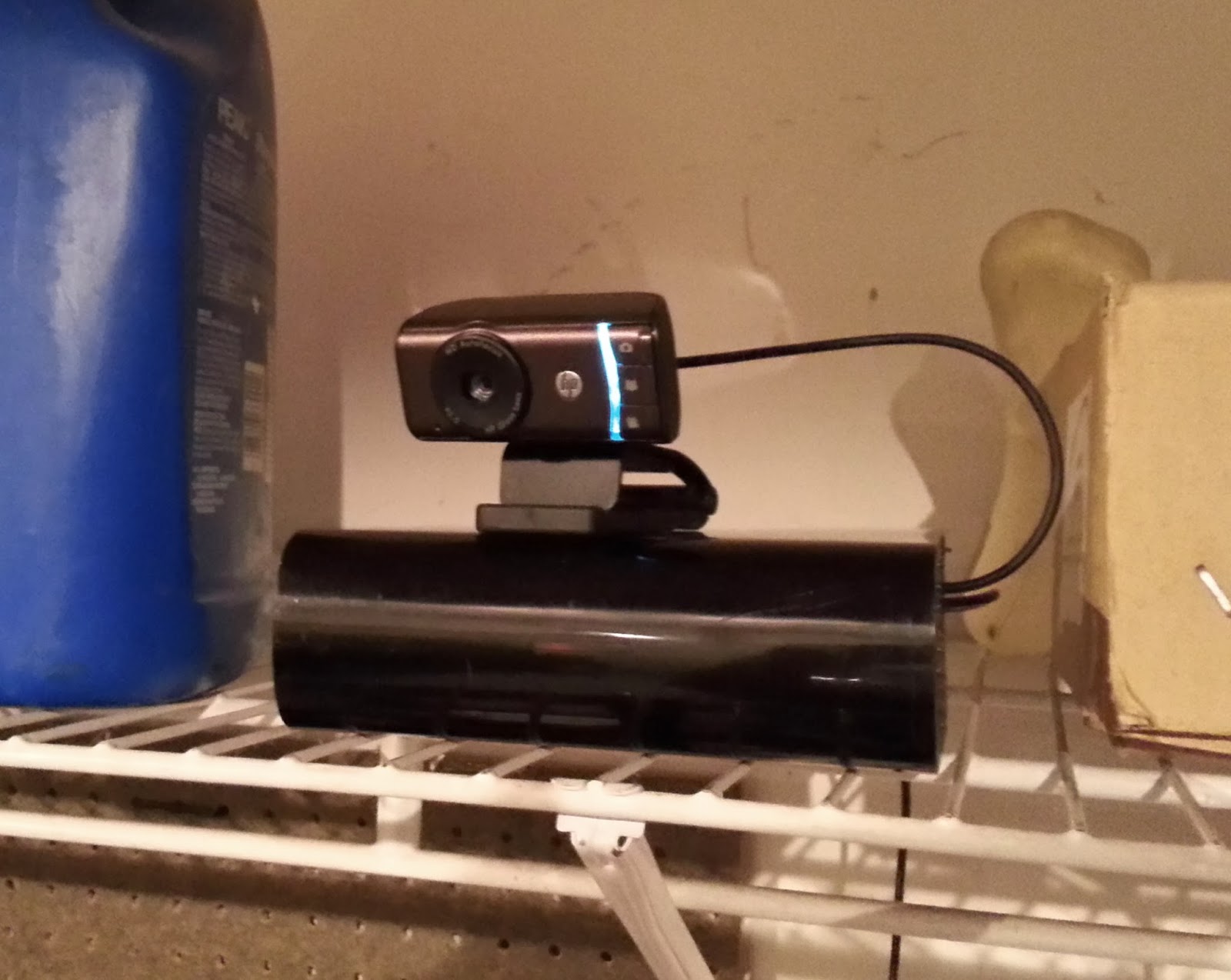
    I added the security camera functionality to the Raspberry Pi I've been working on, using an inexpensive HP Webcam HD-3110 and the Motion subsystem. Both worked out of the box using the Raspberry Pi and the default (but upgraded to latest) NOOBS installation. Neither had an issue, and I was up and running with a security camera quickly. Another nice thing about Motion is that it exposes several external commands as a means to provide API exposure... so I can integrate a web application or send an e-mail at the start of an event. It would be great to send an e-mail whenever motion is detected, and send the video or photos related to the event.

    Once the security camera was working and stable, I added back in the GPIO garage door opener remote that I hacked together. Working together, I now have a security system for the garage that can open and close the garage door from any vantage point. I deployed it up on a shelf, next to the windshield wiper fluid, where the webcam would have a nice perch.

    I whipped together a quick Python script that would briefly engage the GPIO pin on the Raspberry Pi, so now I can sit at my laptop and watch the garage door go up and down. Ultimately I will place this feature behind a web application for ease of use. The Python support for Raspberry Pi seems to be a first-class citizen, so I might use Bottle to create a minimalist webapp for exposing the webcam feed and garage door controls.


    I still need to build an enclosure... and perhaps upgrade the camera to one without an infrared filter and an array of IR LEDs. The web interface will be the next thing on the docket however.

    Tuesday, October 22, 2013

    Your Barn Door is Open

    One compulsive behavior I can't seem to shake is the fear that I have left the garage door open. I count the squares on the front, I measure the light and shadows, I obsess. To tell the truth, even if I had a magic device that would send me a message every time the garage door opened or shut, I wouldn't trust it. I have to see it.

    To feed my neurosis, I began working on a combo surveillance camera / garage door controller with an Internet interface. The first thing I attempted to get working was the method of opening the garage door; up to this point it seems like most efforts have been using a relay to close the switch of the hard-wired "big button" for the garage door opener. I wanted to have the freedom to place the device anywhere I wish, not unlike the garage door keypad that comes with most openers now. A spare Chamberlain universal remote was just sitting in my garage, so I decided to shuck it and rip out the logic board within.

    The board actually had a fairly nice layout and a hidden third button. I only needed one button... and a way to trigger it without a physical press. Using a complicated tool called a "screwdriver-like thingee" I pried the physical button off, leaving nothing but the leads behind.

    Instead of sharp metal prongs, I got the ole' trusty soldering iron out and melted the solder enough to pull the leads out. I replaced two of the leads with pins for easy breadboarding.

    I have a weird affinity towards MOSFETs. I'm not entirely sure why. I have a feeling that my affinity to using a MOSFET instead of a relay is similar to most people's opinions on using an Arduino instead of a Raspberry Pi. With such snobbery in mind, I prototyped out a circuit that would use an N-channel MOSFET to close the circuit instead of a switch.

    Bear in mind I paid no attention in 6.002x, so my circuit has less to do with elegance and common sense as it did with "let's slap together a MOSFET and pull down resistor." Still, sending the 2.2V from a GPIO pin into the MOSFET's gate pin allows the circuit to close on the garage door opener, sending the door up and down.

    Next up is adding a surveillance to the Raspberry Pi using a USB camera I found lying around. The plan is to try out the Motion subsystem, then adapt things as needed. One particular enhancement I'm keeping my eye on is the Raspberry Pi Infrared Camera, which I might pair with a set of IR LED's and a fisheye lens. Doing so may require some patching of Motion, but should otherwise be straightforward.

    Thursday, August 15, 2013

    My Electric Slide

    I love Hack a Day. I've never actually constructed a featured project, but the site has always been a fantastic read to see what's top on the minds of the hacker front. One particular Hack a Day review caught my eye - "a light following bristlebot as a way to teach science." What I found particularly interesting was how well the build instructions were documented on the Science Buddies site. The background was descriptive without being verbose, the parts were easy to come by from both Fry's & SparkFun, and the component count was nice 'n' low. I wasn't sure if the kids would enjoy it, but I knew that at least I would.

    Now bear in mind I attempted to take MIT's 6.002x class before my brain took an enormous sidetrack and instead ended up with a comparative analysis with Stanford's Coursera. While I did find out what a high-voltage pickle looked like, my understanding of Thevenin voltage is limited to indecipherable algebra illustrating the "Thin Mint voltage" of a circuit. I generally don't know what I'm doing, and exploding diodes are not a rare occurrence. It took me considerable research before coming to understand what the three pins of a MOSFET are responsible for. To this day I cannot quite grasp why a pull-down resistor is required for normal operation (even when there is no "bad wiring"). I need simple, otherwise something is going to end up charred and melted.

    The project went much better than expected. I performed some initial prototyping to make sure it was easy to teach the kids, and things went surprisingly well out of the gate. We ended up sticking with the project far longer than I expected, and even added our own enhancements to boot. We're now on build #4 and going strong. Directional control is actually quite good, and there was enough room for minor tweaks and improvements on the breadboard.

    Conveniently enough, when I placed my initial SparkFun order I also slipped in a Raspberry Pi - Model B as well. In the spirit of teaching electronics while remaining completely selfish, I justified the purchase by teaching Python programming using Minecraft while experimenting with GPIO programming on the sly. I was able to have moderate success teaching Python; I constructed a small lesson plan using Martin O'Hanlon's API tutorial as a reference. That turned into a good weekend software development lesson, however I didn't get as much traction with that project as I did with the bristlebots. Luckily for my ulterior motives, I now had a general purpose postcard computer for more breadboard projects. Several tiny wires later, I was able to get a Python script to blink an LED on a breadboard. Between vibrating toothbrush heads and a $40 miniscule flashing light, I started to brainstorm bigger things.

    Now I'm getting back into 6.002x - Circuits & Electronics and starting over again. I'm much more engaged given this new context - and will likely take the class MUCH slower than the real-time course would otherwise allow. Should be fun.

    Saturday, February 23, 2013

    The Standing Sloth

    I returned to work after Thanksgiving last year, sat down at my desk and felt... absolutely gross. There was stuffing in my veins, broccoli cheese casserole in my gut and I could feel my flesh slowly molding around my office chair. The previous summer the Internets were all the rage about the famous infographic detailing how "Sitting is Killing You," and sites such as Lifehacker were consistently running stories of people constructing their own standing desks. I decided enough was enough and decided to try the standing desk thing.

    The desk I was using at the time was huge, solid and immobile - a single and secured wooden boat in a 10' by 6' L-shape. There was no freaking way I could elevate it to standing height. At first I thought I would just build something roughly hewn from 2x4's but instead I noticed a blocky, simple accent table at Target. Worst case I thought I could saw off the legs to height.

    In addition I had found an older storage ottoman sitting in my garage with a half-broken lid. It was quite nearly the same height as the two accent tables, so I thought I might see if it was of any use as well.

    I placed both tables and the ottoman side-by-side on top of the desk. To my surprise the tables were the perfect height for a keyboard, mouse, monitor and a laptop riser. My arms were bent at a 90 degree angle, the top of my monitors were at eye level and I could shift my weight around to avoid locking my knees. For the first two weeks I alternated between sitting and standing... but soon I was standing 6 hours a day.

    Here we are, over a year later. The only alteration I have made has been a comfort floor mat to stand on, and then only because I moved to a cement floor. I must admit that people mocked me for a good while... people kept coming into my office asking "what are you doing? Do you really stand all day? Really? REALLY?" And yes, co-workers sitting adjacent to me were treated to being eye-level with my butt all day.

    People eventually got accustomed to me standing and even became interested in converting to a standing desk as well. A nice side effect is that it is easier to have conversations with people who walk over... no longer do I have to stare up their nose while someone asks questions from above. I lost (and kept off) ten pounds, which is nice. No more lower back problems either, which may have less to do with standing and more to do with me sitting like an crooked monkey.

    Not bad for around $100, half of which was a nice standing mat. All I needed was busted furniture from home, tables made for a college dorm room and a laptop stand.

    Thursday, February 21, 2013

    Re-Examining Development Platforms

    I've been granted an opportunity for perspective lately. I've done my best to steer away from .NET development up until recently - not because I had any particular gripes, but the technology platform just never seemed to be a great fit. C# as a language is pretty great... delegates, tail closure and nullable references are a welcome respite. VisualStudio isn't bad. If you judge IDEs by how many times they make you swear in a given workday, I'd say my four-letter word tally is comparable to that of me using Eclipse. In fact, once my development environment was up and running I thought I might grow to enjoy .NET development.

    And then I started to use the foundation classes. First off... I'll acknowledge that no platform has ever been able to get dates and times "right." This is ever more apparent with .NET... who for some inexplicable reason have no real sense of this "epoch" thing that EVERY OTHER PLATFORM USES. Milliseconds since year zero are expressed as... integers? On top of that, time span arithmetic is only accurate when math is done using "ticks," which themselves are not really accurate to 1/10000 of a millisecond. I didn't go for the caesium clock upgrade in my current laptop.

    Java developers often complain that anonymous classes are inelegant or verbose within Java. C# has abandoned anonymous classes in lieu of their delegate-based event handling system. However, C# developers exposed to anonymous inner classes actually seem to like them. A common gripe actually turns out to be a nifty feature when you're talking about event handling. The C#/.NET event handling mechanism isn't that fantastic... it's largely just a loose convention for using delegates. No extras or nice GoF listener patterns provided like a PropertyChangeListener.

    Zooming out from design patterns and looking at .NET from an enterprise integration pattern perspective, the .NET platform is definitely at a major disadvantage when compared to JVM-based platforms. I've already covered the state of .NET integration frameworks but to recap: it's still nearly five years behind. My time with EasyNetQ has been great, but I still find myself wishing I could use Apache Camel to construct bigger things using common EIP components.

    Despite the current rant, I've been fairly complacent with my new development platform. What really stirred things back up for me was when I cracked open the JMeter-Rabbit-AMQP plugin so that I could do RPC-based load testing of EasyNetQ services. Being a JMeter extension, JMeter-Rabbit-AMQP was a Java app that required me to fire up NetBeans once again and do some Java hacking. Once I did... damn. Until I made that sudden switch back I didn't see the huge gap that existed between .NET and Java development. While C# has some advantage over the Java language, the JVM platform is still leaps ahead.

    Once you begin talking about instrumentation the gap grows even wider. I have grown accustomed to the fantastic introspection and profiling offered by Java Management Extensions and VisualVM; by contrast Microsoft's laughable implementation of Performance Counters has caused me more problems than it has solved. If it works (and it often doesn't due to permissions issues or outright registry corruption) there is no instrumentation that allows for live modification of managed objects or details on garbage collection. The actual .NET API to create and maintain performance counters is actually not bad, but the Performance Counter UI is so clunky and ill-conceived that it is often difficult to make use of it.

    In the end... it doesn't matter. You do the best you can with the tenured development stack because ultimately it's not about the underlying technology - it's about the squishy, business-logicy brain inside of it. Keeping that squishy brain... err... braining is the most important thing.

    Wednesday, January 30, 2013

    Enjoying Walled Gardens

    For the fourteen years prior prior to last June I had consistently used some variation of a Dell laptop with Linux - initially RedHat but quickly switching over to SuSE. Occasionally I would dual-boot into Windows to do some gaming, but all of my work and development was done within KDE. I really had no desire to change, even when I was lugging a 12-pound behemoth Precision laptop with openSUSE and Windows 7. Muscle strain aside, I was content with the setup.

    The next job I moved to was going to be a switch from my conventional Java development to .NET, so I decided to take the opportunity to change up my workstation as well. I moved away from Wintendo/Linux and moved wholesale into OS X, since my new position delightfully coincided with the release of the latest MacBook Pro’s. Gone was my comfortable NetBeans environment, and instead I had to use VisualStudio within Parallels. No more Linux... and at the time I was confident I would hate OS X and re-build the laptop with KDE 4.

    That was eight months ago.

    The .NET ecosystem hasn't been fantastic... immersion has not worked in its favor there. The move to OS X has been considerably more pleasant. By and large OS X is still *nix at its heart and ports abound. Even my favorite photo management / digital darkrooom Digikam works within OS X. I haven't really been missing any apps as of yet other than Pidgin. Yeah, there's Adium... but... meh.

    The ease of use is much greater as well. The application-based firewall works well, instant messaging integration works (albeit without OTR support), calendaring and mail integration works without issue. By and large things work without any futzing. This is doubly true with the rest of the family; while my attempts to get the household at large on openSUSE + KDE 4 failed miserably, the hand-me-down OS X workstations we've been reusing have been adopted with great enthusiasm. All walks of life have been happy to use 4+ year old iMacs with Snow Leopard, no complaints.

    Apple's lustre has been slowly seeping away with the stylish kids of today, but it's hard to deny they've built a solid platform. Yes, it does this by sacrificing your freedom of choice and reducing your hardware upgrade paths. But for now... the walled garden is a damn nice place to just chill out and get some work done.

    Friday, September 07, 2012

    The State of .NET Integration Frameworks

    I have been increasingly working with teams that are largely operating within the .NET platform, so I’ve needed to abandon my old favorites in the Scala / Java / Python world. An interesting thing that strikes me (and many others I’ve discussed the topic with) about the .NET ecosystem is how there are no good analogs for .NET frameworks to Java or Python frameworks. Yes, there are projects such as NHibernate, Log4Net or even Spring.NET - but these often are exercises in trying to shave a square peg down so it can fit into a round hole. Even SpringSource seems to be pulling back from .NET support, as its support has becoming increasingly shallow when compared to Java.

    Gone are the days of relying on integration frameworks such as Apache Camel. Instead I needed to survey the .NET landscape for integration frameworks that would allow for the development of loosely-coupled service components that can be horizontally scaled and messages intelligently routed. While there were a few frameworks that helped with RPC-style message passing to private queues, not a whole lot implemented the whole EIP enchilada.

    Following is a brief survey of what I found for .NET frameworks or libraries that can help build a distributed message-based architecture. I would love any feedback - so much of this is subjective, and I’m sure I’m still only scratching the surface. I tried to weigh the weaknesses and strengths of each framework to see which would best provide implementations of Enterprise Integration Patterns.

    Windows Communication Foundation

    Windows Communication Foundation (WCF) was released by Microsoft as a way to unify different ways the .NET framework communicated with other services. WCF abstracts SOAP and REST API calls, queued messaging, .NET remoting and other technologies under a single framework for service-oriented development.

    Strengths

    WCF is integrated natively within .NET 3.5 and beyond as a supported tenant of the Microsoft .NET framework. Since WCF is a first-party solution it enjoys the full support of Microsoft, receives regular updates and is in tune with the .NET release cycle.

    WCF is a straight-forward integration framework that provides a familiar interface for remote connectivity using well-known messages. Its endpoint design is analogous to the messaging endpoints defined by Enterprise Integration Patterns (EIP), and it appears message construction follows EIP as well.

    Weaknesses

    While WCF provides a working implementation of EIP messaging endpoints and message construction, it does not necessarily provide concrete implementations of the message routing, messaging channels or message transformation. Instead WCF provides bindings to other routing and channel implementations such as MSMQ, datagram sockets, REST and SOAP.

    NIntegrate

    NIntegrate appears to have been discontinued and is no longer eligible for evaluation.

    NServiceBus

    NServiceBus is a nearly decade-old SOA framework built to a custom set of distributed service patterns. In its own words: "If you design your system according to the principles laid out [as part of its design patterns], NServiceBus will make your life a lot easier. On the other hand, if you do not follow these principles, NServiceBus will probably make them harder."

    The principles of NServiceBus are largely aligned with those of asynchronous messaging, which is referred to as the "one-way messaging" pattern. It also offers several stand-alone helper processes for distributing tasks, managing timeouts, and providing service gateways.

    Strengths

    NServiceBus does not appear to be as complex as an Enterprise Service Bus, but is more robust than WCF. While WCF does not provide a queue-based message bus by default, NServiceBus does dictate that queued messages be used.

    Both Publish/Subscribe as well as Request/Reply messaging is supported by NServiceBus, which is another strength over WCF’s focus on remote process invocation. In addition NServiceBus appears to provide transaction support and durable messaging for guaranteed message exchanges. Transactional and durable messages are persisted via RavenDB (an ACID-compliant document database).

    Messages within NServiceBus are well-defined constructs that include headers for routing message exchanges. Marshalling is provided by NServiceBus to automatically convert objects into documents for submission to message queues.

    [update 2013-08-16: Udi Dahan has brought to my attention that, at the time of this blog post, NServiceBus also supported sagas as a way for workflows to be defined as long-lived transactions. Unit testing libraries were also provided. Both appear to have later inspired similar implementations within MassTransit.]

    Weaknesses

    NServiceBus is strongly coupled to its underlying implementation. MSMQ is currently the only supported messaging channel, albeit with a good deal of custom bindings for transaction support, durable messaging, quality of service and publish/subscribe support. Support for other channels such as AMQP has been considered as part of NServiceBus’ roadmap, but has not yet been implemented.

    Durable messaging is only provided via RavenDB, which is a freely available open source project. A RavenDB instance must be separately maintained and managed.

    MassTransit

    MassTransit is "a lean service bus implementation for .NET," not unlike NServiceBus. Instead of working on top of WCF, MassTransit has created an endpoint and message abstraction of its own. In doing so, MassTransit allows for a wider breadth of implementations for messaging channels and document marshalling.

    MassTransit message handling and channels are defined using Dependency Injection and Inversion of Control, which allows for better protoyping and unit testing of components.

    Strengths

    One of MassTransit’s primary strengths is its flexible channel architecture. Implementations can leverage MSMQ, ActiveMQ, RabbitMQ and TIBCO for message channels and JSON, XML or other document types for marshalling. MassTransit also supports a wide variety of IoC containers (or no container at all, in theory).

    Messages can be simple POCOs without annotation or implementation of another interface. Likewise message handlers (i.e. message consumers) can be simple classes that require a minimum of instrumentation.

    Transactional and persistent messaging is supported. This also has multiple methods of implementation depending on preference.

    MassTransit has an interesting implementation of .NET state machines for managing workflow and transactional messaging, called “sagas.” Sagas provide a way for workflows to be succinctly defined and efficiently process long-lived transactions. This could possibly be an efficient way to implement an Aggregator or Scatter-Gather Enterprise Integration Pattern.

    So that developers can more easily create unit tests over consumers and handlers, MassTransit offers a testing library that more easily allows a local message bus to be constructed within the context of a given unit test. This greatly eases the development of unit tests by providing a supported framework for local unit testing.

    Weaknesses

    The MassTransit project itself can give the appearance of not being well maintained and entirely documented. The project has shifted from Google Code to GitHub while documentation is hosted within a stand-alone site. On occasion one will find dead links, outdated examples and incomplete documentation.

    The AMQP routing implementation (the wire protocol also used by RabbitMQ) used by MassTransit is sub-par. The documentation indicates that routing keys are often lost from the message headers, and it appears only fanout exchanges are supported. MassTransit’s routing engine appears to compensate for this, however this obviates the efficiencies often gained when using AMQP bindings. In particular this hurts interoperability, since reply queues can be difficult to create based upon a fanout exchange. While MassTransit can use AMQP as a transport layer, it does not fully take advantage of AMQP’s capabilities.

    Concurrent consumption is determined based on the entire message bus, not on each message consumer. This does not allow developers or operations to throttle the precise number of concurrently running threads permitted to respond to incoming messages. These sorts of quality of service levels are determined for the entire message bus.

    Rhino Service Bus

    The authors of Rhino Service Bus are the organization Hibernating Rhinos, who are also responsible for the document store RavenDB. There are many similarities between NServiceBus and Rhino Service Bus, most notably the emphasis on "one-way" asynchronous messaging. Also not unlike NServiceBus the primary queueing mechanism is MSMQ, however Hibernating Rhinos’ own Rhino Queues service is also supported for durable and transactional messages.

    Rhino Service Bus was designed to be architecturally very much like NServiceBus and MassTransit, but more lightweight and with a slightly different design for private subscription storage.

    Strengths
    Rhino Service Bus implements both request/reply as well as publish/subscribe message exchange patterns using "one-way" asynchronous messaging. Message handling within Rhino Service Bus is very succinct; processing an inbound message requires only the implementation of an interface with a known message type.

    While most integration frameworks in this survey appear to favor programmatic configuration by defining configuration variables in code, Rhino Service Bus defines settings with an external configuration file. In environments already accustomed to using external configuration files as part of their build process, this can reduce implementation cost.

    Since the Rhino Service Bus’ persistent messaging schemes are directly integrated with Rhino Queues, it appears that installation, maintenance and patching will be more straight-forward than with NServiceBus.

    The method for the selective consumption of messages is interesting - Rhino Service Bus uses generics to match endpoints with inbound messages. Only inbound messages of a declared type will be dispatched to a local endpoint.

    Weaknesses

    Rhino Servie Bus can only use either MSMQ or Rhino Queues as the message channel. More advanced brokers such as RabbitMQ are currently not supported, and there appears to be no proposed support on Hibernating Rhinos’ roadmap.

    Once again, Rhino Service Bus configuration is XML based. While this is also cited as a strength, I know several engineers who instead consider this a liability. Personal preference on behalf of many developers seems to favor programmatic configuration over static configuration files.

    Rhino Service Bus appears to have limited quality of service properties, likely due to an emphasis on transactions and stateful messaging via MSMQ. The service bus itself seems to have a central focus of maintaining stateful messaging, as opposed to routing stateless exchanges.

    Spring.NET Integration

    The Spring framework was one of the premier IoC frameworks for the Java Platform, and the SpringSource team has released a similar IoC framework for the .NET platform as well. Current incarnations of Spring (including those on the .NET platform) span beyond just depdency injection; it also includes data abstraction layers, messaging frameworks and service integration components.

    A large initiative released by the SpringSource team in 2008 was Spring Integration, an integration framework that was meant to simplify the development of service oriented application development. Just as the initial Spring container was meant to be a concrete implementation of the "Gang of Four" (GoF) Programming Design Patterns, Spring Integration was meant to be a strict implementation of Gregor Hohpe’s Enterprise Integration Patterns.

    Strengths
    Adherence to the Enterprise Integration Patterns is one of Spring Integration’s primary strengths. An integration framework with a focus on pattern-driven development helps designers and engineers develop applications with well-defined solutions to problems. Spring Integration relies heavily on the Spring IoC framework, which also enforces GoF Design Patterns. By matching both of these well-proven enterprise design patterns developer productivity can be increased and code can be more easily tested.

    Spring Integration offers an abstraction of message routing and message channels that allows the integration of best-of-breed implementations to more easily be performed. Broker implementations can range from AMQP, JMS, flat files, peer-to-peer, etc.

    Weaknesses
    Currently Spring Integration for .NET is in “incubator” stage within SpringSource. This can be considered to an open beta release of a project, where development is heavily underway and the given framework is subject to change at any time. Judging by the activity stream on the project’s issue tracker, it appears that there is currently only one engineer assigned to the project who last committed changes in March of 2010.

    Since Spring Integration is closely tied to the Spring Framework, no alternate dependency injection containers are supported. While many integration frameworks surveyed rely on Castle Windsor, Spring Integration instead relies on the Spring IoC framework.

    Spring.NET AMQP

    The Spring framework was one of the premier IoC frameworks for the Java Platform, and the SpringSource team has released a similar IoC framework for the .NET platform as well. Current incarnations of Spring (including those on the .NET platform) span beyond just depdency injection; it also includes data abstraction layers, messaging frameworks and service integration components.

    Spring.NET AMQP is not an integration framework, but instead provides "templates" as a high-level abstraction for messaging. While this doesn’t provide message routing directly, Spring.NET AMQP allows developers to establish routing keys and bindings that permit an AMQP broker to properly route messages.

    The scope of Spring.NET’s abilities is roughly analogous to that of Microsoft’s WCF, with the addition of dependency injection and inversion of control containers.

    Strengths

    Within the Spring.NET AMQP project, adherence to the AMQP feature set is the primary focus of SpringSource. This allows engineers to fully leverage brokers such as RabbitMQ and perform topic exchanges, content-based routing and multicasting.

    Weaknesses

    Spring.NET AMQP is a lightweight templating library which does not provide any adherence to Enterprise Integration Patterns. Routing and message transformation is not supplied by the framework, however it can more easily be implemented by the developer.

    EasyNetQ

    When users encounter difficulties when integrating .NET integration frameworks, a common alternative cited is EasyNetQ. While not necessarily an integration framework, EasyNetQ allows for messages to be more easily routed via RabbitMQ, not unlike the Spring AMQP project.

    The EasyNetQ was inspired by MassTransit and created for use by the airline travel company 15below. The primary goals of the project are maintaining a very simple API and requiring minimal (if not zero) configuration. Code required for requests, replies and subscriptions are fairly minimal.

    Strengths

    EasyNetQ was created from the ground-up to take advantage of the AMQP specification’s message routing capabilities, and attempts to fully leverage the routing capabilities inherent to AMQP brokers. By adhering to the AMQP standard and expected behavior, interoperability between .NET and other platforms becomes an easier task. To accomplish the goal of zero or little configuration required to start using EasyNetQ, the framework accomplishes most setup tasks by convention. This allows for safe defaults to be easily chosen and reduced the amount of code that needs to be written.

    Just as MassTransit implements "sagas" for long-running business processes, EasyNetQ provides a saga framework for workflows to be succinctly defined and efficiently process long-lived transactions. In a very similar way the EasyNetQ saga support could be an efficient way to implement an Aggregator or Scatter-Gather Enterprise Integration Pattern.

    Connection management to the message broker has been implemented in a fail-safe way within EasyNetQ. Broker connections are performed using a "lazy connection" approach which by default assumes the broker will not be available at all times. If a broker is not available, messages are queued locally and the broker is polled until it comes online. Once the message broker is available, messages resume transmission. Bear in mind publishers of message are not aware of this outage; they continue without halting. This works in contrast to most other integration frameworks which throw exceptions or halt when the broker goes offline.

    Weaknesses

    Many integration frameworks under review directly integrate with another dependency injection framework such as Castle Windsor, however EasyNetQ does not have a direct integration with any such dependency injection framework. This has the benefit of requiring less dependencies, however it also makes the management of endpoint objects a bit more convoluted. This is not to say that a dependency injection framework cannot be used - indeed a IoC container can be very easily used alongside EasyNetQ. Other integration frameworks, however, effectively use dependency injection frameworks to auto-discover endpoints by type and greatly simplify the registration of message consumers. Such auto-discovery is not immediately available from EasyNetQ libraries.

    Limiting the number of concurrent consumers is currently not something readily supported by EasyNetQ. While most integration frameworks allow you to rate limit consumption based on the number of concurrent threads, EasyNetQ does not currently offer this as a configurable property. Instead EasyNetQ provides the scaffolding for asynchronous responses backed by a blocking collection. Worker threads are added to the blocking collection, which them accept each request as they become available.

    Time to Live settings are not easily accessible within the EasyNetQ framework, however facilities do exist to set message expiration settings directly within AMQP. Since this facility is not readily available, it makes quality of service a bit more difficult to establish for messages.

    EasyNetQ does not offer a testing framework to assist with the construction of unit tests. Instead it is up to the developer to construct a mock message bus with which to test message production and consumption. This may not necessarily make the development of unit tests more difficult however, since endpoints are much more simply defined than with other frameworks.

    Creating A New, Internal Framework

    Creating a new integration framework is often regarded as a universally poor idea among developers. The YAGNI development assistant was created explicitly for monitoring an engineer’s behavior within an IDE and preventing the independent development of yet another framework for features "that aren’t necessary at the moment, but might be in the future."

    If proper alternatives do not seem to exist as integration frameworks, it may be necessary to evaluate creating a new, first-party integration framework. If the sponsoring organization is committed to contributing to the open-source community, leveraging the community at large to develop an inter-operable solution may provide a unique framework that fills a need within the .NET ecosystem.